
Amazon S3
Read documents from and write converted outputs to S3-compatible storage
Amazon S3 Connector
The S3 connector allows you to read documents from and write converted outputs to S3-compatible object storage. While designed for Amazon S3, it works with any S3-compatible service (MinIO, DigitalOcean Spaces, IBM Cloud Object Storage, etc.). Use it as both a source (to read documents for conversion) and a target (to write converted results).
Prerequisites
- AWS Account (or S3-compatible service account)
- S3 Bucket: One or more buckets for your documents
- Access Credentials: Access key and secret key with appropriate permissions
Setup and Authentication
For Amazon S3
1. Create or Use Existing Bucket
- Log in to the AWS Console
- Navigate to S3
- Click Create bucket (or use an existing bucket)
- Choose a bucket name and region
- Configure settings as needed
2. Create Access Keys
- Navigate to IAM → Users
- Select your user (or create a service user)
- Go to Security credentials tab
- Click Create access key
- Choose Application running outside AWS
- Save the access key ID and secret access key securely
See AWS documentation on access keys for more details.
3. Identify Endpoint
AWS S3 uses region-specific endpoints in the format:
s3.<region>.amazonaws.comExamples:
s3.us-east-1.amazonaws.com(US East, N. Virginia)s3.us-west-2.amazonaws.com(US West, Oregon)s3.eu-west-1.amazonaws.com(Europe, Ireland)
See AWS S3 endpoints for a complete list.
For S3-Compatible Services
For services like MinIO, DigitalOcean Spaces, or IBM Cloud Object Storage:
- Obtain the service endpoint from your provider
- Generate access credentials through your provider's console
- Use the service-specific endpoint instead of AWS endpoints
Configuration
The S3 connector can be used as both a source and target in the Batch API.
Required Parameters
| Parameter | Type | Description |
|---|---|---|
kind | string | Must be "s3" |
endpoint | string | S3 service endpoint without protocol (e.g., s3.us-east-1.amazonaws.com) |
access_key | string | S3 access key ID |
secret_key | string | S3 secret access key |
bucket | string | Bucket name to read from or write to |
Optional Parameters
| Parameter | Type | Default | Description |
|---|---|---|---|
key_prefix | string | "" | Prefix for object keys (folder path). For sources, filters which objects to read. For targets, prepends to output object names |
verify_ssl | boolean | true | Use SSL to connect to S3. Set to false only for local development with self-signed certificates |
max_num_elements | integer | null | (Source only) Maximum number of objects to process from this source |
Connector-Specific Behavior
As a Source
When used as a source, the connector:
- Traverses the bucket: Reads all objects matching the
key_prefixfilter - Respects limits: Stops after
max_num_elementsobjects if specified - Maintains hierarchy: Object keys preserve the original folder structure
- Filters by prefix: Only processes objects whose keys start with
key_prefix
As a Target
When used as a target, the connector:
- Writes to bucket: Uploads converted outputs to the specified bucket
- Preserves structure: Maintains source document folder structure in object keys
- Adds prefix: Prepends
key_prefixto all output object keys for organization - Non-destructive: Never modifies or deletes source objects
Object Naming
- Source objects:
<key_prefix><original-object-key> - Target objects:
<key_prefix><source-filename>.<format>
Example: Source object documents/report.pdf with key_prefix: "converted/" becomes converted/report.md
Security and Permissions
Required IAM Permissions (AWS S3)
As a Source:
s3:ListBucket- List objects in buckets3:GetObject- Read object data
As a Target:
s3:PutObject- Write object data
Limitations
- Bucket Must Exist: The connector does not create buckets. Create them manually before running batch jobs.
- Throughput: Subject to S3 rate limits and network bandwidth
Usage Examples
There are three main ways to interface with the connectors. All use the same underlying POST /v1/convert/source/batch endpoint.
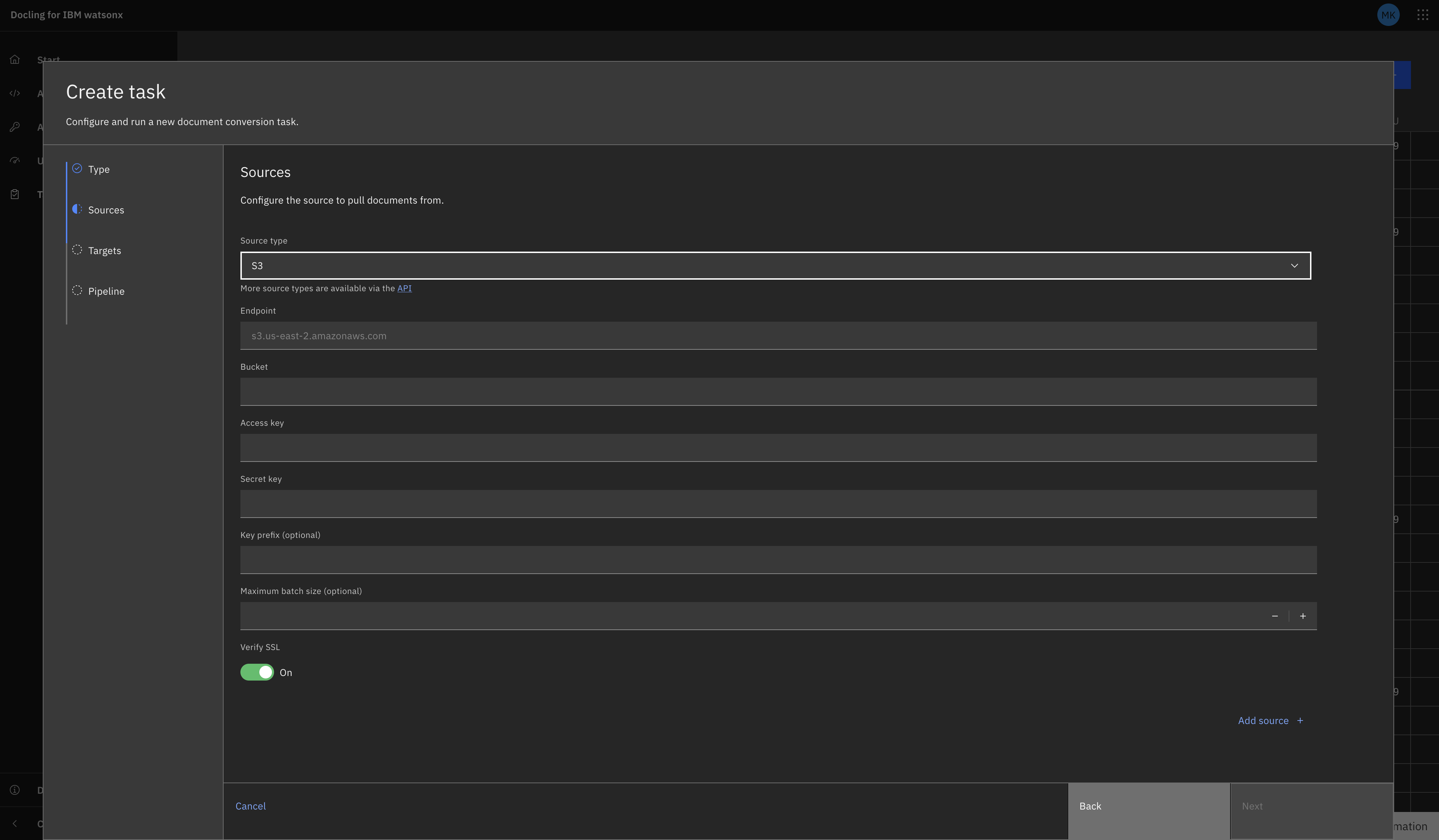
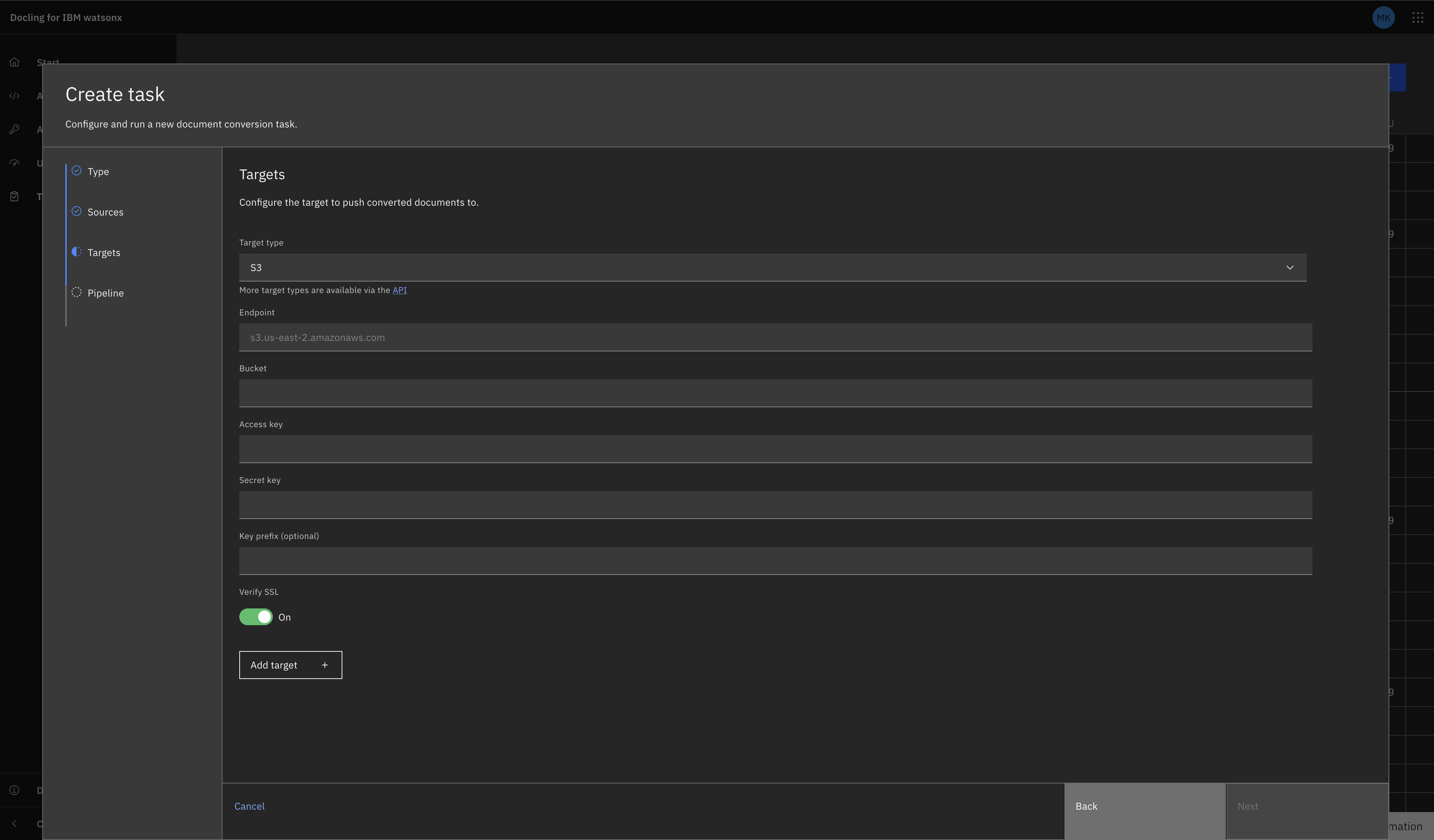
Tasks UI
Navigate to the Tasks view and select "Create Task +". Select Batch as the task type (connectors use batch tasks, not single).
Fill in the fields as prompted. They should correspond to the fields gathered above (excluding 'kind').
S3 as a Source
S3 as a Target
REST API
curl -X POST "${DOCLING_SERVICE_URL}/v1/convert/source/batch" \
  -H "X-Api-Key: ${DOCLING_API_KEY}" \
  -H "Content-Type: application/json" \
  -d '{
    "sources": [
      {
        "kind": "s3",
        "endpoint": "s3.us-east-1.amazonaws.com",
        "access_key": "YOUR_ACCESS_KEY",
        "secret_key": "YOUR_SECRET_KEY",
        "bucket": "my-input-bucket",
        "key_prefix": "documents/",
        "max_num_elements": 100
      }
    ],
    "target": {
      "kind": "s3",
      "endpoint": "s3.us-east-1.amazonaws.com",
      "access_key": "YOUR_ACCESS_KEY",
      "secret_key": "YOUR_SECRET_KEY",
      "bucket": "my-output-bucket",
      "key_prefix": "converted/"
    },
    "options": {
      "to_formats": ["md", "json"]
    }
  }'
Python SDK
from docling.service_client import DoclingServiceClient
from docling.datamodel.service.requests import S3SourceRequest
from docling.datamodel.service.targets import S3Target
import os

SERVICE_URL = os.getenv("DOCLING_SERVICE_URL")
API_KEY = os.getenv("DOCLING_API_KEY")
AWS_ACCESS_KEY = os.getenv("AWS_ACCESS_KEY_ID")
AWS_SECRET_KEY = os.getenv("AWS_SECRET_ACCESS_KEY")

with DoclingServiceClient(url=SERVICE_URL, api_key=API_KEY) as client:
    job = client.submit_batch(
        sources=[
            S3SourceRequest(
                endpoint="s3.us-east-1.amazonaws.com",
                access_key=AWS_ACCESS_KEY,
                secret_key=AWS_SECRET_KEY,
                bucket="my-input-bucket",
                key_prefix="documents/",
                max_num_elements=100
            )
        ],
        target=S3Target(
            endpoint="s3.us-east-1.amazonaws.com",
            access_key=AWS_ACCESS_KEY,
            secret_key=AWS_SECRET_KEY,
            bucket="my-output-bucket",
            key_prefix="converted/"
        ),
        output_formats=["md", "json"]
    )

    # Wait for completion
    response = job.result()
    print(f"Processed {response.num_converted} documents")
    print(f"Succeeded: {response.num_succeeded}")
    print(f"Failed: {response.num_failed}")
S3-Compatible Service Example (MinIO)
curl -X POST "${DOCLING_SERVICE_URL}/v1/convert/source/batch" \
  -H "X-Api-Key: ${DOCLING_API_KEY}" \
  -H "Content-Type: application/json" \
  -d '{
    "sources": [
      {
        "kind": "s3",
        "endpoint": "minio.example.com:9000",
        "access_key": "minioadmin",
        "secret_key": "minioadmin",
        "bucket": "documents",
        "verify_ssl": false
      }
    ],
    "target": {
      "kind": "presigned_url"
    }
  }'
Related Documentation
- Batch API Reference - Complete batch endpoint documentation
- Connectors Overview - All available connectors
- Amazon S3 Documentation - Official AWS S3 documentation
- AWS Access Keys - Creating and managing access keys
- S3 Endpoints - List of AWS S3 regional endpoints