
FileNet
Read documents from IBM FileNet Content Manager
FileNet Connector
The FileNet connector reads documents from IBM FileNet Content Manager (part of IBM Cloud Pak for Business Automation) for conversion. This connector is source-only and uses the Content Services GraphQL API.
Prerequisites
- Cloud Pak for Business Automation (CP4BA): Access to a CP4BA instance with Content Cortex subscription
- FileNet Repository: A configured FileNet repository (e.g.,
OS1) - Zen API Key: Generated by a CP4BA administrator for authentication
- Username: Your FileNet username
- GraphQL Endpoint: Content Services GraphQL API URL
Setup and Authentication
Get Zen API Key
- Contact your CP4BA administrator to generate a Zen API key for your username
- The API key is used for authentication to the Content Services GraphQL API
Locate GraphQL Endpoint
The Content Services GraphQL endpoint URL typically follows this format:
https://<your-cp4ba-host>/content-services-graphqlContact your CP4BA administrator if you need help locating the endpoint.
Identify Repository
FileNet uses repository identifiers (typically OS1 for the default object store). Confirm your repository ID with your administrator.
Configuration
The FileNet connector is used as a source in the Batch API. Configure it in the sources array of your request.
Required Parameters
| Parameter | Type | Description |
|---|---|---|
kind | string | Must be "filenet" |
base_url | string | FileNet Content Services GraphQL API endpoint URL |
username | string | FileNet username |
api_key | string | Zen API key for authentication |
repository_id | string | FileNet repository identifier (e.g., "OS1") |
Optional Parameters
| Parameter | Type | Default | Description |
|---|---|---|---|
folder_id | string | null | Folder path (e.g., "/my-folder") or folder GUID (e.g., "{FOLDER-ID-GUID}") to read documents from. If omitted, reads from entire repository |
document_ids | array | [] | List of specific document IDs to process. If specified, overrides folder_id |
max_num_elements | integer | null | Maximum number of documents to process |
Connector-Specific Behavior
Document Selection Modes
The connector supports three modes for selecting documents:
-
Specific Documents: Provide
document_idsarray with one or more document IDs- Only the specified documents are processed
- Overrides
folder_idif both are provided
-
Folder Mode: Provide
folder_id(path or GUID)- Processes all documents within the specified folder
- Supports both folder paths (
"/my-folder") and folder GUIDs ("{GUID}")
-
Repository Mode: Omit both
folder_idanddocument_ids- Processes all documents in the repository
- Use
max_num_elementsto limit scope
Folder Specification
The folder_id parameter accepts:
- Folder path:
/path/to/folder(starts with/) - Folder GUID:
{FOLDER-ID-GUID}(wrapped in braces)
Document Limits
Use max_num_elements to control how many documents are processed:
- In folder mode: stops after N documents from the folder
- In repository mode: stops after N documents from the repository
- With
document_ids: limits which documents from the list are processed
Security and Permissions
Required Permissions
Your Cloud Pak instance itself must have the GraphQL API enabled.
This is sometimes a manual admin configuration.
Your FileNet user account must have:
- Read access to the target repository
- Read access to folders and documents you want to process
- Permission to use the Content Services GraphQL API
Authentication
The connector uses Zen API key authentication:
- Username and API key are sent with each GraphQL request
- API keys should be treated as sensitive credentials
- Keys are scoped to your user account's permissions
Limitations
- GraphQL API Required: Requires Content Services with GraphQL API enabled
- Cloud Pak for Business Automation: This connector has been specifically designed and tested for CP4BA deployments.
Usage Examples
There are three main ways to interface with the connectors. All use the same underlying POST /v1/convert/source/batch endpoint.
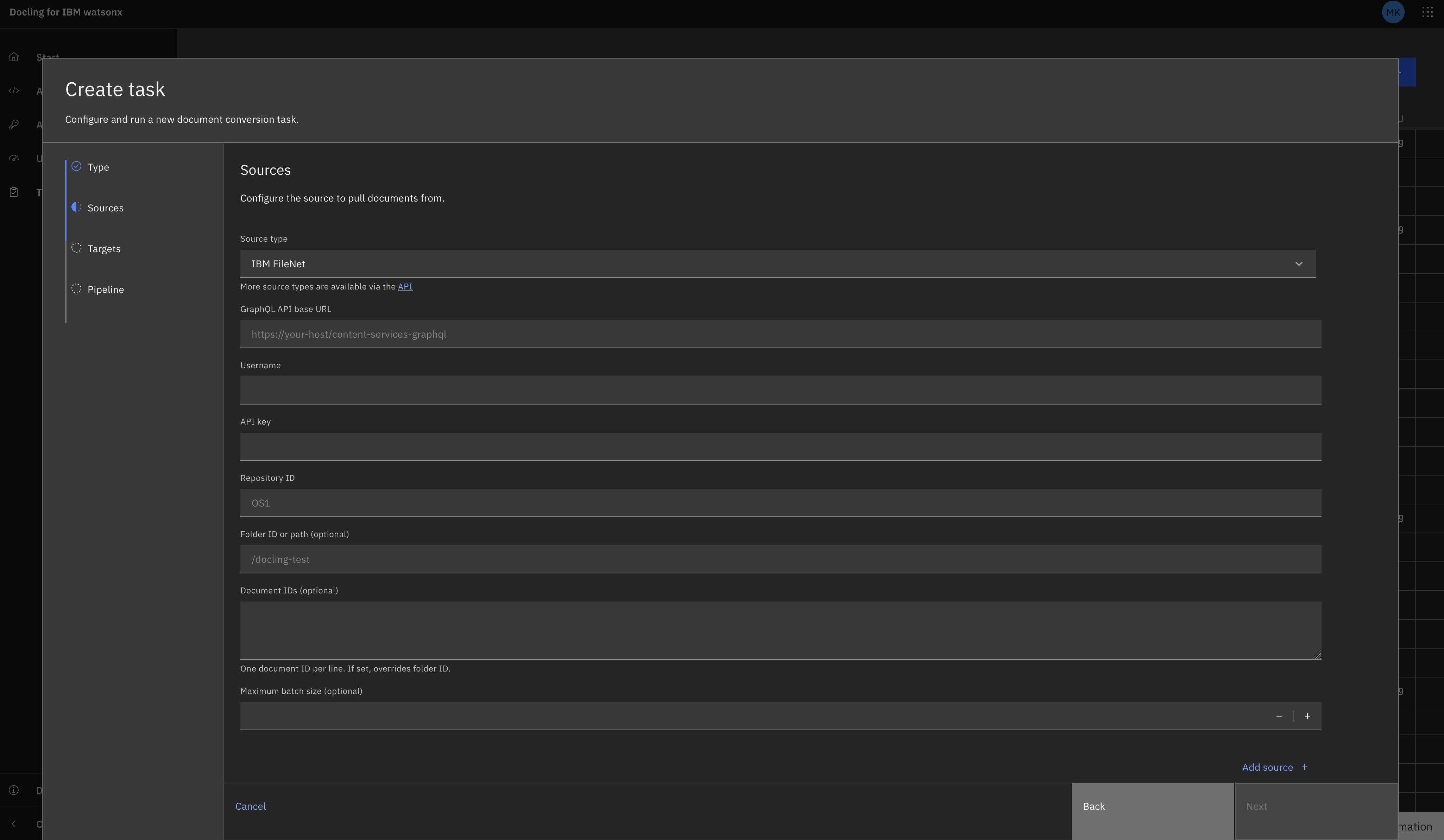
Tasks UI
Navigate to the Tasks view and select "Create Task +". Select Batch as the task type (connectors use batch tasks, not single).
Fill in the fields as prompted. They should correspond to the fields gathered above (excluding 'kind').
FileNet as a Source
REST API
curl -X POST "${DOCLING_SERVICE_URL}/v1/convert/source/batch" \
  -H "X-Api-Key: ${DOCLING_API_KEY}" \
  -H "Content-Type: application/json" \
  -d '{
    "sources": [
      {
        "kind": "filenet",
        "base_url": "https://your-cp4ba-host/content-services-graphql",
        "username": "your-username",
        "api_key": "your-zen-api-key",
        "repository_id": "OS1",
        "folder_id": "/my-documents",
        "max_num_elements": 50
      }
    ],
    "target": {
      "kind": "presigned_url"
    },
    "options": {
      "to_formats": ["md", "json"]
    }
  }'
Read Specific Documents
curl -X POST "${DOCLING_SERVICE_URL}/v1/convert/source/batch" \
  -H "X-Api-Key: ${DOCLING_API_KEY}" \
  -H "Content-Type: application/json" \
  -d '{
    "sources": [
      {
        "kind": "filenet",
        "base_url": "https://your-cp4ba-host/content-services-graphql",
        "username": "your-username",
        "api_key": "your-zen-api-key",
        "repository_id": "OS1",
        "document_ids": ["{doc-id-1}", "{doc-id-2}"]
      }
    ],
    "target": {
      "kind": "presigned_url"
    },
    "options": {
      "to_formats": ["md"]
    }
  }'
Python SDK
Python SDK Note: This connector is not included in the standard docling.datamodel.service package. When using the Python SDK, configure it using GenericSourceRequest with keyword arguments. You do not need to install docling-jobkit.
from docling.service_client import DoclingServiceClient
from docling.datamodel.service.requests import GenericSourceRequest
from docling.datamodel.service.targets import PresignedUrlTarget
import os

SERVICE_URL = os.getenv("DOCLING_SERVICE_URL")
API_KEY = os.getenv("DOCLING_API_KEY")

# FileNet source configuration
filenet_source = GenericSourceRequest(
    kind="filenet",
    base_url="https://your-cp4ba-host/content-services-graphql",
    username="your-username",
    api_key="your-zen-api-key",
    repository_id="OS1",
    folder_id="/my-documents",
    max_num_elements=50
)

with DoclingServiceClient(url=SERVICE_URL, api_key=API_KEY) as client:
    job = client.submit_batch(
        sources=[filenet_source],
        target=PresignedUrlTarget(),
        output_formats=["md", "json"]
    )

    # Wait for completion
    response = job.result()
    print(f"Processed {response.num_converted} documents")
    print(f"Succeeded: {response.num_succeeded}")
    print(f"Failed: {response.num_failed}")

    # Print document results
    for doc in response.documents:
        print(f"{doc.filename}: {doc.status}")
Related Documentation
- Batch API Reference - Complete batch endpoint documentation
- Connectors Overview - All available connectors
- IBM FileNet Content Manager - Official FileNet documentation
- Cloud Pak for Business Automation - CP4BA documentation