
Google Cloud Storage
Read documents from and write converted outputs to Google Cloud Storage
Google Cloud Storage Connector
The Google Cloud Storage (GCS) connector allows you to read documents from and write converted outputs to GCS buckets. Use it as both a source (to read documents for conversion) and a target (to write converted results).
Prerequisites
- Google Cloud Project: A GCP project with Cloud Storage API enabled
- GCS Bucket: One or more buckets for your documents
- Authentication: Service account key
Setup and Authentication
1. Create a Service Account
- Go to the GCP Console
- Navigate to IAM & Admin → Service Accounts
- Click Create Service Account
- Enter a name and description
- Click Create and Continue
2. Grant Permissions
Assign the appropriate role:
- Storage Object Viewer - For reading from buckets (source)
- Storage Object Creator - For writing to buckets (target)
- Storage Object Admin - For both read and write
3. Create and Download Key
- Click on the newly created service account
- Go to the Keys tab
- Click Add Key → Create new key
- Choose JSON format
- Download and save the JSON key file securely
The JSON key contains all required fields:
{
  "type": "service_account",
  "project_id": "my-gcp-project",
  "private_key_id": "...",
  "private_key": "-----BEGIN PRIVATE KEY-----\n...\n-----END PRIVATE KEY-----\n",
  "client_email": "[email protected]",
  "client_id": "...",
  "auth_uri": "https://accounts.google.com/o/oauth2/auth",
  "token_uri": "https://oauth2.googleapis.com/token",
  "auth_provider_x509_cert_url": "https://www.googleapis.com/oauth2/v1/certs",
  "client_x509_cert_url": "...",
  "universe_domain": "googleapis.com"
}
Configuration
The GCS connector can be used as both a source and target in the Batch API.
Required Parameters
| Parameter | Type | Description |
|---|---|---|
kind | string | Must be "google_cloud_storage" |
bucket | string | GCS bucket name |
service_account_key | object | Service account credentials JSON (see below) |
Optional Parameters
| Parameter | Type | Default | Description |
|---|---|---|---|
key_prefix | string | "" | Object key prefix (folder path). For sources, filters which objects to read. For targets, prepends to output object names |
project | string | null | GCP project ID. Optional if already specified in service account key |
max_num_elements | integer | null | (Source only) Maximum number of objects to process from this source |
Service Account Key Object
When providing service_account_key, include these fields from your downloaded JSON key file:
| Field | Type | Required | Description |
|---|---|---|---|
type | string | Yes | Always "service_account" |
project_id | string | Yes | GCP project ID |
private_key_id | string | Yes | Key ID of the private key |
private_key | string | Yes | RSA private key in PEM format |
client_email | string | Yes | Service account email address |
client_id | string | Yes | Numeric client ID |
auth_uri | string | Yes | OAuth 2.0 authorization endpoint |
token_uri | string | Yes | OAuth 2.0 token endpoint |
auth_provider_x509_cert_url | string | Yes | X.509 certificate URL for auth provider |
client_x509_cert_url | string | Yes | X.509 certificate URL for service account |
universe_domain | string | Yes | Google Cloud universe domain (typically "googleapis.com") |
Connector-Specific Behavior
As a Source
When used as a source, the connector:
- Traverses the bucket: Reads all objects matching the
key_prefixfilter - Respects limits: Stops after
max_num_elementsobjects if specified - Maintains hierarchy: Object names preserve the original folder structure
- Filters by prefix: Only processes objects whose names start with
key_prefix
As a Target
When used as a target, the connector:
- Writes to bucket: Uploads converted outputs to the specified bucket
- Preserves structure: Maintains source document folder structure in object names
- Adds prefix: Prepends
key_prefixto all output object names for organization - Non-destructive: Never modifies or deletes source objects
Object Naming
- Source objects:
<key_prefix><original-object-name> - Target objects:
<key_prefix><source-filename>.<format>
Example: Source object documents/report.pdf with key_prefix: "converted/" becomes converted/report.md
Security and Permissions
Required Permissions
As a Source:
storage.objects.list- List objects in bucketstorage.objects.get- Read object data
As a Target:
storage.objects.create- Write object data
Predefined Roles:
- Storage Object Viewer - Read-only access (source)
- Storage Object Creator - Write-only access (target)
- Storage Object Admin - Full access (both source and target)
Limitations
- Bucket Must Exist: The connector does not create buckets. Create them manually in GCP Console or via
gcloud storageCLI. - Throughput: Subject to GCS bucket quotas and network bandwidth.
Usage Examples
There are three main ways to interface with the connectors. All use the same underlying POST /v1/convert/source/batch endpoint.
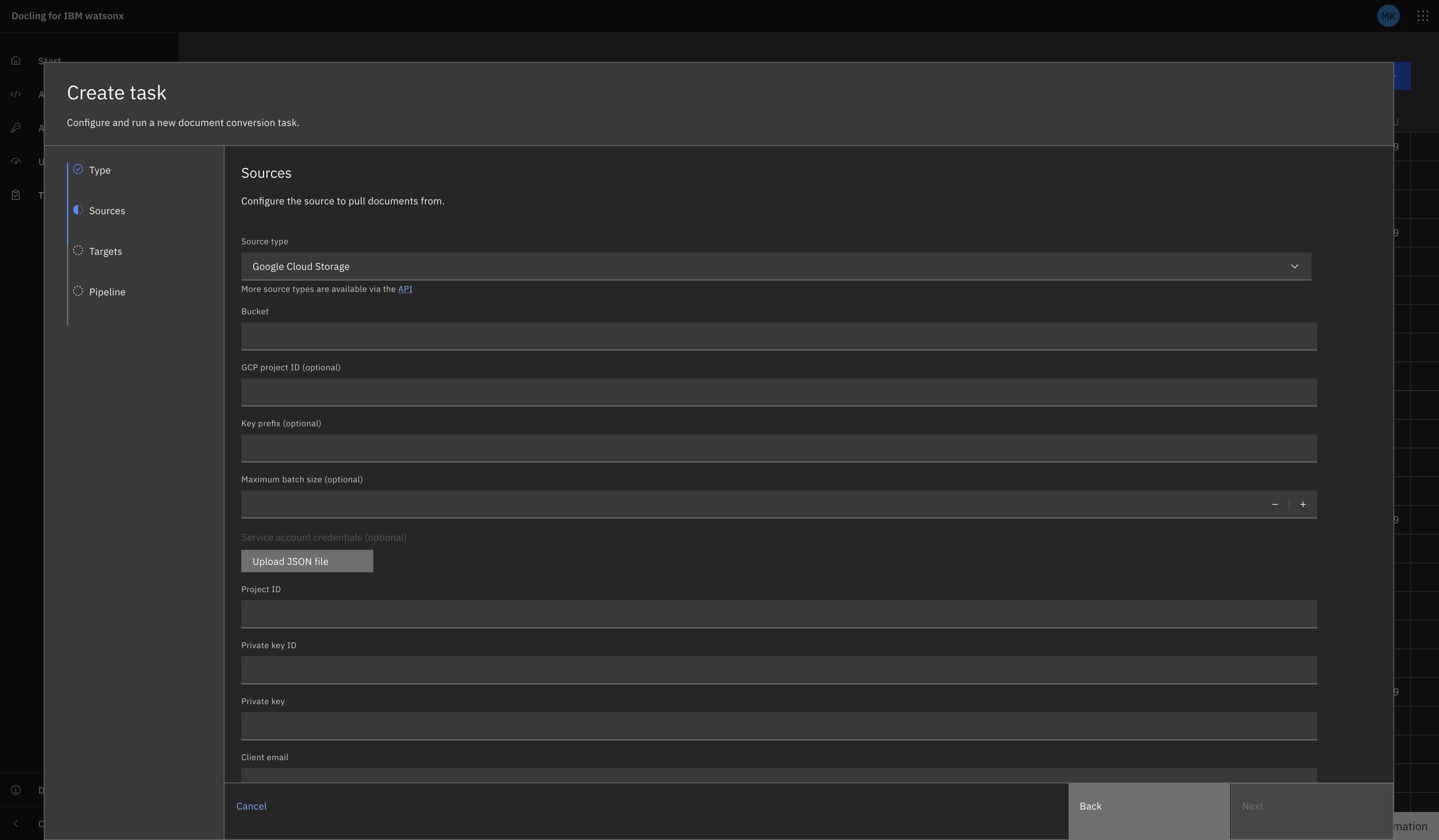
Tasks UI
Navigate to the Tasks view and select "Create Task +". Select Batch as the task type (connectors use batch tasks, not single).
Fill in the fields as prompted. They should correspond to the fields gathered above (excluding 'kind').
GCS as a Source
GCS as a Target
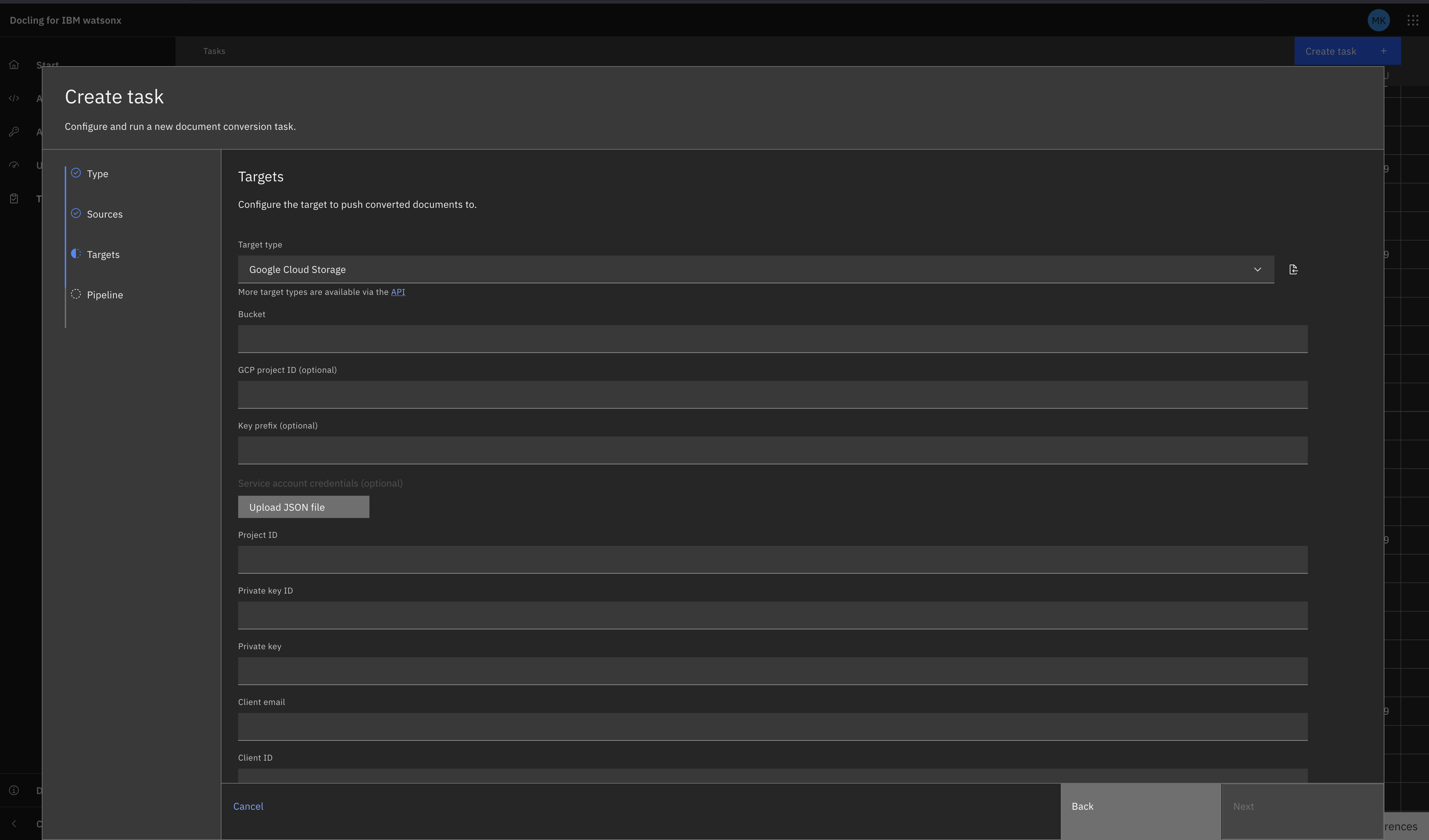
You are given the option to upload a JSON file to populate the auth credentials here.
REST API
curl -X POST "${DOCLING_SERVICE_URL}/v1/convert/source/batch" \
  -H "X-Api-Key: ${DOCLING_API_KEY}" \
  -H "Content-Type: application/json" \
  -d '{
    "sources": [
      {
        "kind": "google_cloud_storage",
        "bucket": "my-input-bucket",
        "key_prefix": "documents/",
        "max_num_elements": 100,
        "service_account_key": {
          "type": "service_account",
          "project_id": "my-gcp-project",
          "private_key_id": "abc123...",
          "private_key": "-----BEGIN PRIVATE KEY-----\n...\n-----END PRIVATE KEY-----\n",
          "client_email": "[email protected]",
          "client_id": "123456789",
          "auth_uri": "https://accounts.google.com/o/oauth2/auth",
          "token_uri": "https://oauth2.googleapis.com/token",
          "auth_provider_x509_cert_url": "https://www.googleapis.com/oauth2/v1/certs",
          "client_x509_cert_url": "https://www.googleapis.com/robot/v1/metadata/x509/...",
          "universe_domain": "googleapis.com"
        }
      }
    ],
    "target": {
      "kind": "google_cloud_storage",
      "bucket": "my-output-bucket",
      "key_prefix": "converted/",
      "service_account_key": {
        "type": "service_account",
        "project_id": "my-gcp-project",
        "private_key_id": "abc123...",
        "private_key": "-----BEGIN PRIVATE KEY-----\n...\n-----END PRIVATE KEY-----\n",
        "client_email": "[email protected]",
        "client_id": "123456789",
        "auth_uri": "https://accounts.google.com/o/oauth2/auth",
        "token_uri": "https://oauth2.googleapis.com/token",
        "auth_provider_x509_cert_url": "https://www.googleapis.com/oauth2/v1/certs",
        "client_x509_cert_url": "https://www.googleapis.com/robot/v1/metadata/x509/...",
        "universe_domain": "googleapis.com"
      }
    },
    "options": {
      "to_formats": ["md", "json"]
    }
  }'
Python SDK
from docling.service_client import DoclingServiceClient
from docling.datamodel.service.requests import GoogleCloudStorageSourceRequest
from docling.datamodel.service.targets import GoogleCloudStorageTarget
import os
import json

SERVICE_URL = os.getenv("DOCLING_SERVICE_URL")
API_KEY = os.getenv("DOCLING_API_KEY")

# Load service account key from file
with open("service-account-key.json") as f:
    service_account_key = json.load(f)

with DoclingServiceClient(url=SERVICE_URL, api_key=API_KEY) as client:
    job = client.submit_batch(
        sources=[
            GoogleCloudStorageSourceRequest(
                bucket="my-input-bucket",
                key_prefix="documents/",
                max_num_elements=100,
                service_account_key=service_account_key
            )
        ],
        target=GoogleCloudStorageTarget(
            bucket="my-output-bucket",
            key_prefix="converted/",
            service_account_key=service_account_key
        ),
        output_formats=["md", "json"]
    )

    # Wait for completion
    response = job.result()
    print(f"Processed {response.num_converted} documents")
    print(f"Succeeded: {response.num_succeeded}")
    print(f"Failed: {response.num_failed}")
Related Documentation
- Batch API Reference - Complete batch endpoint documentation
- Connectors Overview - All available connectors
- Google Cloud Storage Documentation - Official GCS documentation
- Application Default Credentials - ADC setup guide
- Service Account Keys - Creating and managing service account keys